In today’s digital age, the typical user manages around 20 different accounts both online and offline. To protect our identity and ensure our accounts are secure, it’s essential to have strong and unique passwords for all these various services. The challenge is that remembering all the passwords we’ve created can be nearly impossible. That’s why we developed this online password generator to create passwords that are both secure and easier to recall. Here are some helpful tips for crafting a memorable password that remains difficult for others to guess.
- Use a minimum of 8 characters – longer passwords are harder to guess or crack by hackers. To create a strong and easy-to-remember password, you need to have at least 8 characters.
- Numbers, letters & special characters – it is recommended that you use a mix of numbers, upper and lower case letters, and special characters in your password.
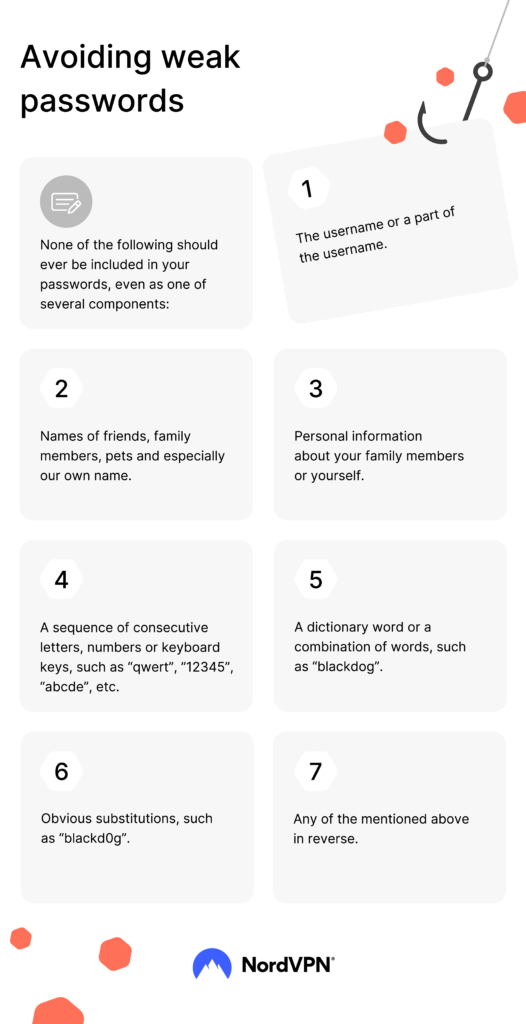
- Don’t use personal information – you should never use any words or numbers that are related to yourself or families such as your house number, phone number, hobbies, social security number, date of birth, car model, or the names of family members or friends. Today’s scammers and hackers are much more sophisticated than we can ever imagine.
- Don’t use a single word from the dictionary – using words from a dictionary is fine as long as you are using multiple unrelated words. When they are combined, it should not make sense. For example, “the green grass” is not a good choice of words since they make sense. On the other hand, “sky monkey needle” is ok since the phrase does not make any sense to anybody.
- Don’t use sequential characters – avoid using sequential numbers like 7,8,9 and sequential letters like a,b,c in a password. These password phrases are easy to get hacked yet they are commonly used by millions of people.